Top Up Balance
Supports online payment and redemption codes. Balance is available immediately after successful top-up.
Overview
Xiaomai API uses pay-as-you-go billing. After topping up, usage is deducted based on actual calls. The platform supports Alipay and WeChat online payment, and also supports redemption codes. Platform credit is credited at 1 RMB = 1 USD-equivalent account balance. This is an internal billing ratio, not a foreign-exchange rate.
Top-Up Entry
Sign in to the Xiaomai API console, find Wallet Management in the left menu, and open the top-up page.
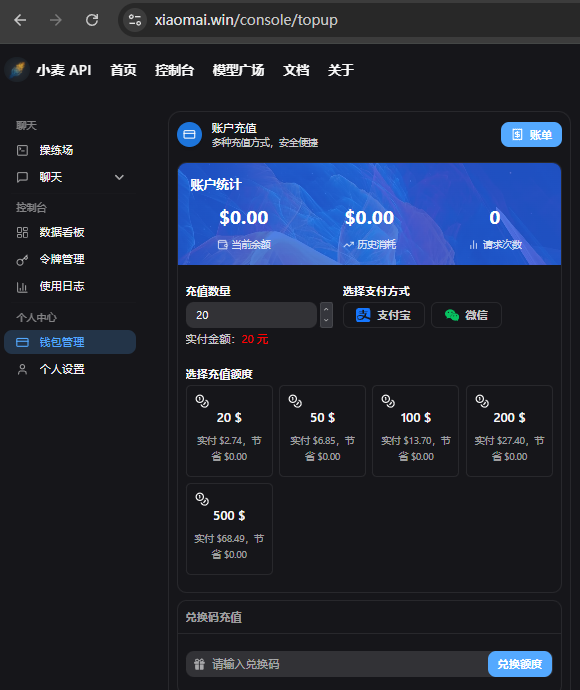
The Account Statistics card at the top shows current balance, historical usage, and request count.
Online Top-Up
Step 1: Choose an Amount
The platform provides preset account-credit amounts of $20, $50, $100, $200, and $500. Click one to select it.
Custom Amount
If the presets do not fit, enter any number directly in the top-up amount field. The minimum is 20.
Step 2: Choose a Payment Method
In the payment-method area, choose:
- Alipay - Scan or redirect to Alipay to pay
- WeChat - Scan to complete payment
Step 3: Complete Payment
After payment succeeds, the balance is credited immediately and the Current Balance value updates.
Payment Not Credited?
Normally the balance arrives within seconds. If it has not arrived after 5 minutes, refresh the page first. If the issue remains, contact support.
Redemption Code Top-Up
If you have a redemption code from an event or a friend, redeem it for balance directly.
- Open the top-up page
- Scroll to the Redemption Code Top-Up area near the bottom
- Enter the redemption code
- Click the redeem button
Tip
After successful redemption, the balance is credited immediately and can be confirmed in Account Statistics. Each code can be used only once. Expired or already-used codes cannot be redeemed.
Bills and Usage Records
Click Bills in the upper-right corner of the top-up page to view:
- Top-up records
- Usage details
- Current balance
Invoice Service
Note
For large top-ups that require an invoice, contact the group owner before topping up.
- Invoices can be requested after actual consumption reaches 500 RMB
- Chinese general VAT invoices and special VAT invoices are supported
- Contact support or the group owner and provide invoice details
FAQ
Balance did not change after top-up
Try refreshing the page. If it still does not update, confirm whether payment really completed in Alipay or WeChat, then contact support.
Redemption code is invalid
- Check whether the code is typed correctly, including case and spaces
- The code may have expired or already been used
- Contact the code issuer for confirmation
Large top-ups
Enterprise users or large top-up needs should contact the group owner or support first. Invoice issuance support is available after the consumption threshold is met.